How to set reverse DNS (PTR records)
Reverse DNS is the hostname other servers see for your IP address. Mail servers need one that matches your mail hostname.
- Where
- Servers → your server → Server controls → Reverse DNS
- For
- every IPv4 address and any IPv6 address in your /64
- Time
- a few minutes to update
Point the hostname at the IP first
Create the forward record at your DNS provider first: an
Arecord (orAAAAfor IPv6) from your hostname, for examplemail.example.com, to the server's IP. Many mail servers check that both directions match.Enter the hostname
Open the server, then Server controls → Reverse DNS. Each IPv4 address has its own row. Type the hostname (1) and press Save (2). Leave the field empty and save to remove the record.
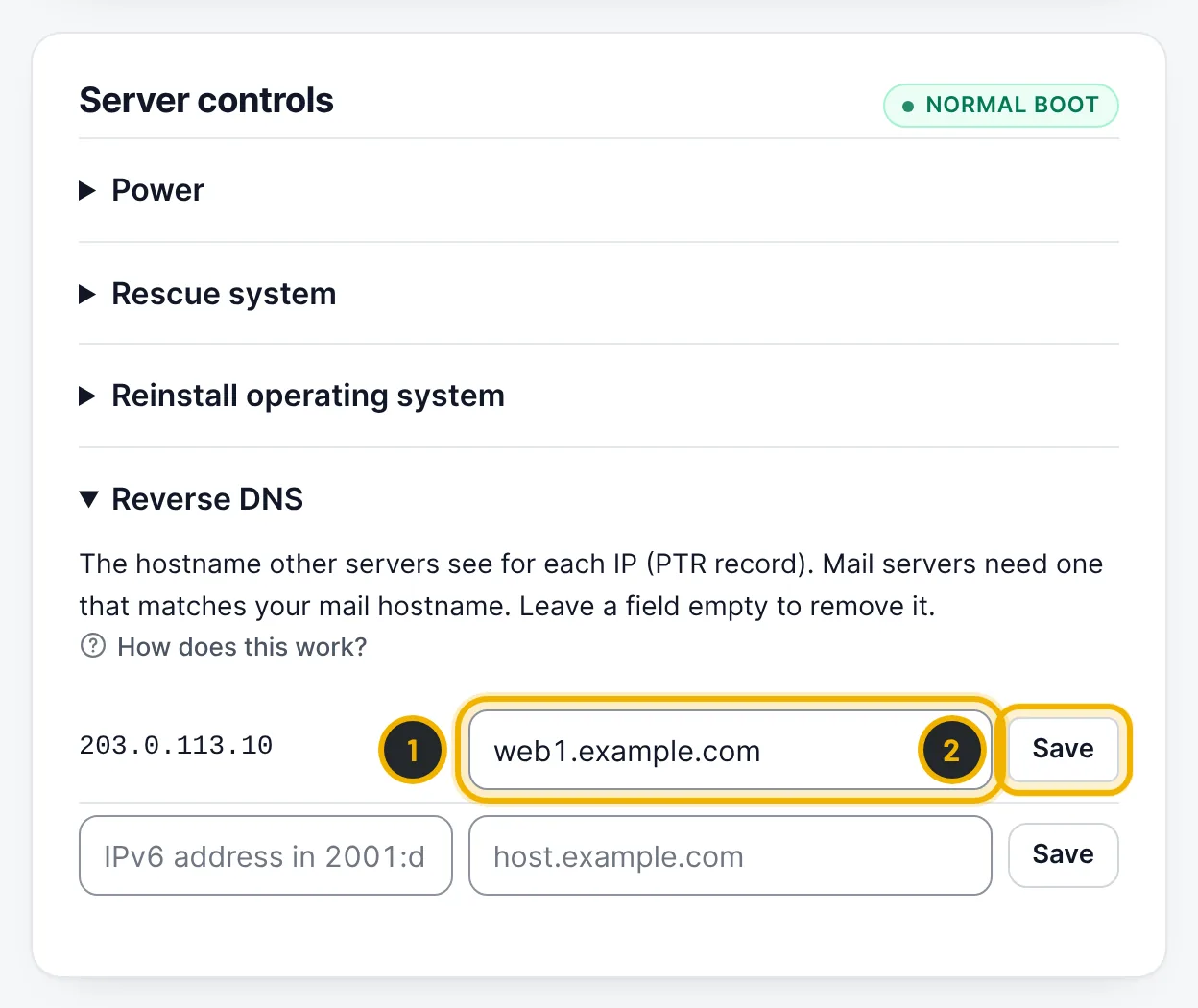
The numbers in the picture match the numbers in the text. Add IPv6 records
Use the last row for IPv6: type the full IPv6 address from your /64 network, the hostname, and press Save.
Questions
Will my customers see DediGermany in the reverse DNS?
No. You set the hostnames, so you can use your own brand everywhere.
Related guides
Still stuck?
Our team answers around the clock. Most questions get an answer within the hour.