How to cancel a server
No minimum term and no notice period. The server runs until the end of the month you paid for.
- Where
- Servers → your server → Cancel this server
- Effective
- end of the paid month
- Data
- erased after the end date
Back up your data
After the end date all data on the server is erased and cannot be recovered. Copy everything you need first.
Open the cancellation form
Open the server and, on the right, unfold Cancel this server. The form shows the last day the server stays online (German time). Optionally tell us why you are leaving.
Confirm
Type
CANCEL(1) and press Cancel at end of term (2). You may be asked to confirm your password. If an invoice for this server is open, pay it first; you can cancel straight after.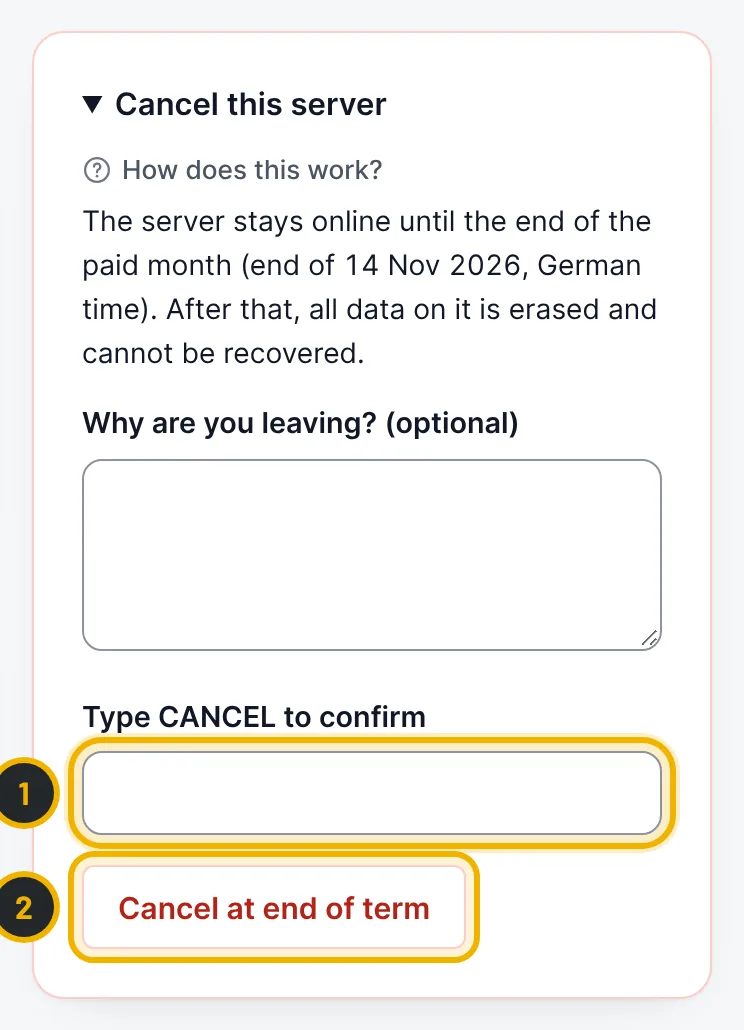
The numbers in the picture match the numbers in the text.
Questions
Do I pay for the rest of the month?
The month is already paid, and the server stays yours until its end. There is no further invoice after a cancellation.
Related guides
Still stuck?
Our team answers around the clock. Most questions get an answer within the hour.