Core i5-13500 dedicated server: what it's good at
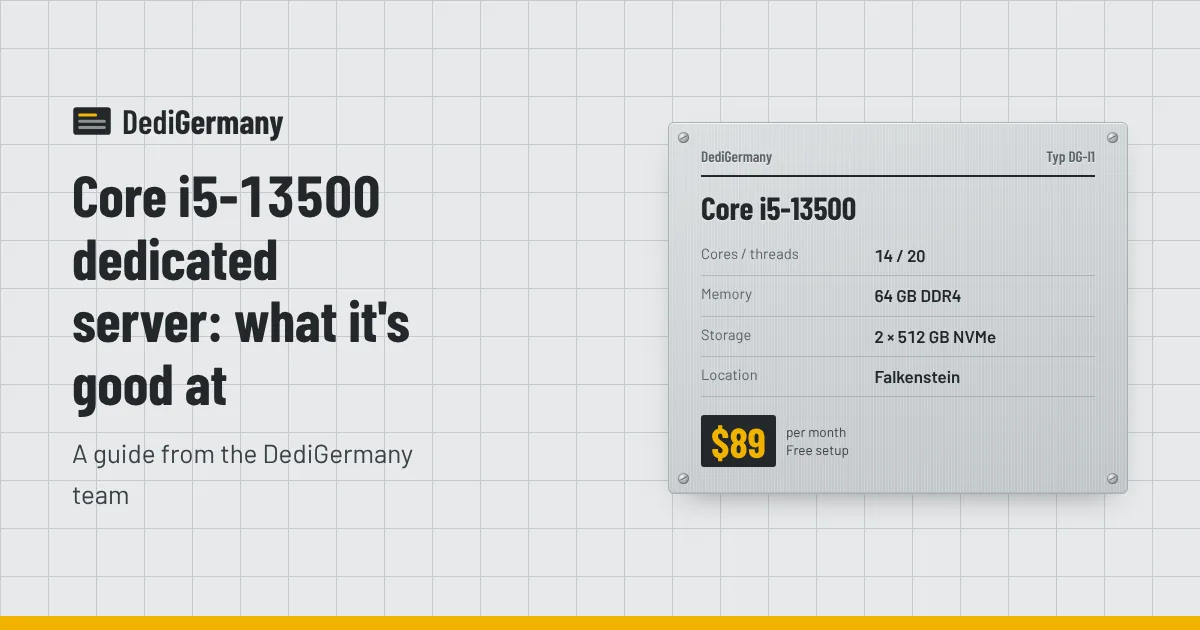
The Core i5-13500 dedicated server is our best value under $100: 14 cores and 20 threads, 64 GB of RAM and 2 × 512 GB NVMe for $89/mo with no setup fee. Its hybrid design pairs fast performance cores with efficient background cores, which makes it a strong fit for game servers, CI runners, web hosting and development environments. Here is how that design works on a server, what it does well, and where its limits are.
The Core i5-13500 dedicated server at a glance
| Component | Specification |
|---|---|
| CPU | Intel Core i5-13500, 14 cores / 20 threads, up to 4.8 GHz |
| Memory | 64 GB DDR4 |
| Storage | 2 × 512 GB NVMe in RAID 1 |
| Network | Unmetered 1 Gbit/s, DDoS protection, 1 IPv4 + /64 IPv6 |
| Location | Falkenstein, Germany |
| Price | $89/mo, no setup fee, no minimum term |
Full details and add-ons are on the Core i5-13500 plan page.
Hybrid P-cores and E-cores explained
The i5-13500 is a 13th generation Intel Core processor with two kinds of cores on the same chip:
- 6 performance cores (P-cores) with Hyper-Threading, giving 12 threads. These are the fast cores that reach the 4.8 GHz boost.
- 8 efficiency cores (E-cores) without Hyper-Threading, giving 8 more threads. They are smaller and run at lower clocks, but they are good at background and parallel work.
That is where the 14 cores and 20 threads come from. For server workloads, the split is useful: latency-sensitive processes, such as a game server's main loop or a web request, run on P-cores, while compression, log shipping, backups, cron jobs and build workers fill the E-cores without slowing the important work. Recent Linux kernels understand the hybrid layout and schedule accordingly.
You can also take control yourself. Run lscpu -e and look at the MAXMHZ column: the logical CPUs with the higher maximum are the P-core threads. Then pin critical services with taskset, systemd's CPUAffinity=, Docker's --cpuset-cpus or the CPU pinning field in a game panel.
What the i5-13500 is good at
Game servers
Game servers live on single-thread speed. Six fast P-cores give you room for several Minecraft servers, a few CS2 instances or a moderate Rust server, with E-cores left over for the panel, database and backups. With DDoS protection included and 64 GB of RAM, it is a solid first game node. Our game server hosting guide covers RAM per game and Pterodactyl setup.
CI runners and build servers
Self-hosted runners for GitHub Actions, GitLab CI or similar systems benefit from many threads and fast storage. Twenty threads let you run several jobs in parallel, NVMe keeps dependency installs and Docker layer pulls quick, and a flat monthly price beats paying per build minute once your pipelines are busy. The unmetered port helps with large image pulls and artifact uploads.
Web hosting and applications
WordPress sites, small SaaS applications, APIs and staging environments run comfortably. P-cores handle request latency; E-cores handle workers, queues and scheduled tasks. 64 GB gives plenty of room for a database, Redis and a page cache.
Development and small virtualisation
For a personal lab or a team's development VMs, 20 threads and 64 GB host a handful of guests under Proxmox VE or plain Docker. For production virtualisation, an ECC plan is the better choice.
How it compares at the low end
| Plan | CPU | Boost | RAM | Storage | Price |
|---|---|---|---|---|---|
| Ryzen 5 3600 | 6c/12t | 4.2 GHz | 64 GB DDR4 | 2 × 512 GB NVMe | $89/mo, no setup fee |
| Core i5-13500 | 14c/20t | 4.8 GHz | 64 GB DDR4 | 2 × 512 GB NVMe | $89/mo, no setup fee |
| Ryzen 7 PRO 8700GE | 8c/16t | 5.1 GHz | 64 GB DDR5 ECC | 2 × 512 GB NVMe | $149/mo + $59 setup |
| Core Ultra 7 265 | 20c/20t | 5.3 GHz | 64 GB DDR5 ECC, up to 192 GB | 2 × 1 TB NVMe, up to 4 × 3.84 TB NVMe DC | $229/mo + $89 setup |
At the same $89 price, the i5-13500 has more than twice the threads of the Ryzen 5 3600, a newer architecture and a higher boost clock. Unless you specifically want an AMD Zen 2 platform, it is the stronger pick. Our comparison of AMD vs Intel dedicated servers goes deeper into the two families, and cheap dedicated servers in Germany compares the budget options in detail.
Running it as a Windows server
The i5-13500 is also a cheap way to run Windows Server in Germany. Add a Windows Server 2025 Standard licence from $39/mo and you get full administrator access over RDP on a machine with 20 threads and 64 GB of memory. That suits remote desktop for a small team, line-of-business applications, or .NET services. Because Windows Server Standard is licensed per physical core, a 14-core CPU keeps licensing modest compared with large server processors. Our Windows dedicated server page covers the options in more detail.
Limits to know before you order
- No ECC memory. The 64 GB is standard DDR4. For production databases or hosting other people's data, the Ryzen 7 PRO 8700GE adds ECC for $60/mo more.
- Fixed memory and storage. RAM stays at 64 GB and storage at 2 × 512 GB. If you expect to grow, the Core Ultra 7 265 scales to 192 GB and four datacenter NVMe drives.
- Standard NVMe, not datacenter NVMe. The drives are mirrored in RAID 1, but write-heavy databases or logging pipelines are better on plans with datacenter NVMe.
- No out-of-band console. Use the rescue system for recovery; remote console via iDRAC Enterprise is a Dell-only feature.
You can add a Windows Server 2025 Standard licence from $39/mo, extra IPv4 addresses for $3/mo, and 1 TB of backup storage for $6/mo. The same CPU also powers our RTX PRO 4000 GPU server in Helsinki, if you later need a GPU.
Is it the right server for you?
If you want the most cores per dollar in Germany, no setup fee and no contract, the Core i5-13500 is hard to beat. Browse the Intel dedicated servers to compare, check the server auction for refurbished alternatives, or order it from its plan page.