Storage server for backups: a build guide
A storage server for backups is one of the most cost-effective things you can rent: lots of hard disk capacity, an unmetered port and a fixed monthly price. Getting real value from it depends on three decisions: the disk layout, the backup software and where the server fits in your overall backup plan. This guide covers all three for our 64 TB, 128 TB and 308 TB storage servers.
The hardware you are starting with
All three storage servers are in our Falkenstein datacenter. Each has NVMe drives for the operating system and fast data, plus a set of SATA hard disks for bulk capacity.
| Server | CPU | Memory | NVMe | Hard disks | Price |
|---|---|---|---|---|---|
| Storage 64 TB | Ryzen 7 3700X, 8c/16t | 128 GB DDR4 ECC | 2 × 1 TB NVMe | 4 × 16 TB SATA (max 4 × 22 TB) | $239/mo, $49 setup |
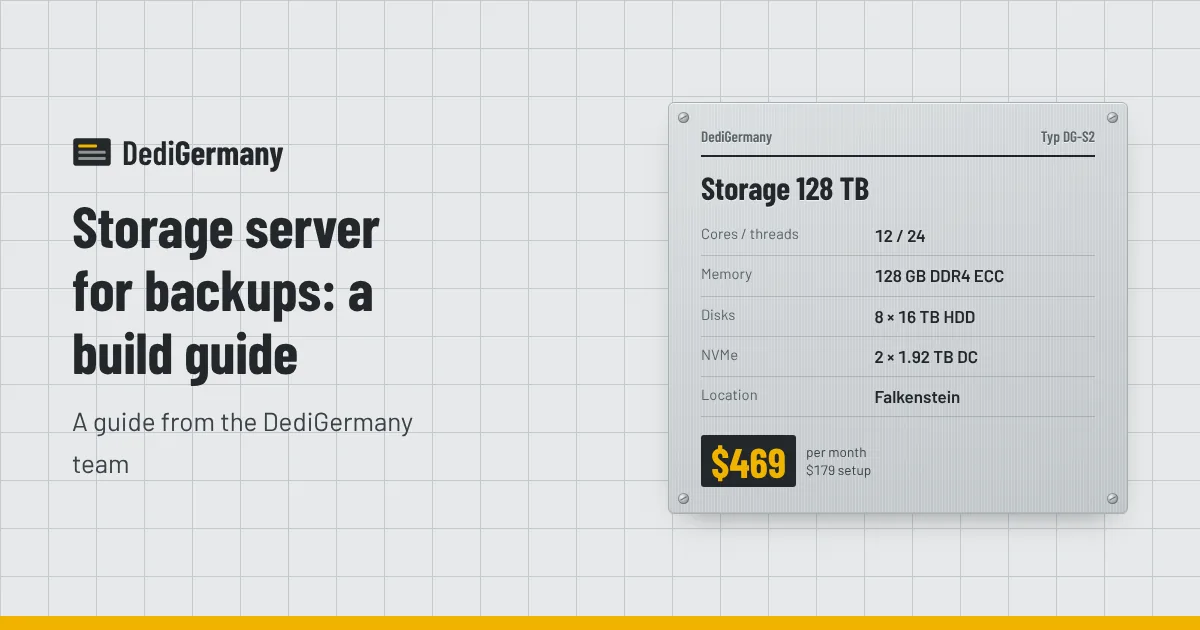
| Storage 128 TB | Ryzen 9 3900, 12c/24t | 128 GB DDR4 ECC | 2 × 1.92 TB NVMe DC | 8 × 16 TB SATA (max 8 × 22 TB) | $469/mo, $179 setup |
| Storage 308 TB | EPYC 7502P, 32c/64t | 256 GB DDR4 ECC Reg | 2 × 7.68 TB NVMe DC | 14 × 22 TB SATA | $1319/mo, $529 setup |
The ECC memory on all three matters for a backup target. ECC corrects single-bit errors, and ZFS in particular relies on memory being trustworthy when it verifies checksums.
Choosing a disk layout: RAID 6 or ZFS raidz2
For a backup server, the goal is to survive disk failures without losing the backups themselves. Large hard disks take a long time to rebuild, and a second disk can fail during that window. That is why dual-parity layouts are the standard choice:
- RAID 6 (for example with Linux mdadm) stores two parity blocks per stripe and survives any two disk failures. Put a conventional file system such as ext4 or XFS on top.
- ZFS raidz2 offers the same two-disk tolerance, and adds end-to-end checksums, self-healing on read, snapshots and transparent compression.
For backups, ZFS is usually the better fit. Checksums catch silent corruption, snapshots give you cheap point-in-time copies of the backup repository itself, and regular zpool scrub runs verify every block. If you prefer a simpler stack you already know, RAID 6 works well too.
Single parity (RAID 5 or raidz1) is not recommended on disks this large, because one more failure during a long rebuild loses the whole array.
Usable capacity math
With RAID 6 or raidz2, usable capacity is roughly (number of disks − 2) × disk size. Remember that disks are sold in decimal terabytes while most tools report binary tebibytes: 1 TB is about 0.91 TiB.
| Server | Layout | Usable (TB) | Approx. TiB |
|---|---|---|---|
| Storage 64 TB (4 × 16 TB) | RAID 6 / raidz2 | 32 TB | ~29 TiB |
| Storage 64 TB (4 × 16 TB) | RAID 10 / two mirrors | 32 TB | ~29 TiB |
| Storage 128 TB (8 × 16 TB) | RAID 6 / raidz2 | 96 TB | ~87 TiB |
| Storage 308 TB (14 × 22 TB) | One 14-disk raidz2 | 264 TB | ~240 TiB |
| Storage 308 TB (14 × 22 TB) | Two 7-disk raidz2 vdevs | 220 TB | ~200 TiB |
A few notes on these figures:
- Four disks. On the 64 TB server, RAID 6 and RAID 10 give the same usable space. RAID 6 survives any two failures; RAID 10 survives two only if they are in different mirrors, but rebuilds faster. For backups, dual parity is the safer default.
- Fourteen disks. A single wide raidz2 vdev maximises space. Two narrower vdevs give up two more disks to parity but rebuild faster and offer better random I/O. For a mostly sequential backup workload, either is reasonable.
- Headroom. File systems, and ZFS especially, slow down as they fill. Plan to stay well short of 100% and treat the last portion as reserve.
- Room to grow. The 64 TB and 128 TB servers can be configured with 22 TB disks, which raises usable raidz2 capacity to 44 TB and 132 TB respectively. Upgrades are quoted on request.
Our post on RAID 1 vs RAID 10 vs ZFS covers disk layouts for general-purpose servers in more depth.
Backup software: rsync, restic and borg
rsync
rsync copies files efficiently, sending only what has changed. On its own it gives you a mirror, not a history: a deletion or a corrupted file on the source is copied over on the next run. Pair it with ZFS snapshots on the backup server (take a snapshot after each sync) and you get cheap daily versions.
restic
restic creates encrypted, deduplicated snapshots and can write to a local path, over SFTP, or to an S3-compatible endpoint. If you run MinIO on the storage server, restic can treat it like object storage. Retention is handled with restic forget --prune and a policy such as keep 7 daily, 4 weekly and 12 monthly.
borg
BorgBackup also deduplicates, compresses and encrypts, and is fast over SSH. A typical setup is to install borg on the storage server, give each client its own repository and an SSH key restricted to borg serve, and run nightly borg create jobs followed by borg prune.
Whichever tool you choose, encrypt on the client so the backup server never sees plaintext, and run regular test restores. A backup you have never restored is only a hope.
Fitting it into the 3-2-1 rule
The 3-2-1 rule says: keep three copies of your data, on two different kinds of storage, with one copy offsite. A storage server fits naturally as the offsite copy.
- Copy 1: your production data on your application servers.
- Copy 2: a local or near-line copy, such as snapshots on the production server or a backup on another machine.
- Copy 3: your storage server in Germany, in a separate location from production.
If your production servers are also with us in Falkenstein, keep another copy somewhere else as well, such as in your office or with another facility, so a single site is never the only place your data lives. For small amounts of data from one of our servers, the 1 TB backup storage add-on at $6/mo is a lightweight alternative to a whole storage server.
Practical setup tips
- Use the NVMe drives well. Keep the OS on them, and on ZFS consider a mirrored special vdev or a fast area for backup tool caches and indexes.
- Restrict access. Allow SSH only with keys, and only from your source servers' IP addresses.
- Schedule scrubs monthly and alert on any checksum errors or degraded pools.
- Monitor disk health with smartctl. Failed disks are replaced on site, around the clock.
- Use the bandwidth. The unmetered 1 Gbit/s port means large initial seeds and nightly runs never add to the bill. A 10 Gbit/s uplink is available on request for selected storage servers.
If you also want to serve files from the same machine, the storage servers make good hosts for Nextcloud or MinIO. See the database server hosting page if your backups are mainly database dumps and you are planning the primary server too.
To compare capacities and prices, see all storage servers; the Storage 128 TB plan is a balanced starting point for most backup targets.